How to type Chinese characters on a Mac
You do not need a Chinese keyboard, and you do not need to download anything. macOS already includes Pinyin – Simplified. You add it once under System Settings → Keyboard, press Ctrl + Space to switch to it, and then type Chinese the way people in China actually do: spell the sound in ordinary letters, and pick the characters from the window that appears.
What an input source actually is
There are tens of thousands of Chinese characters and about a hundred keys, so nobody types a character directly. Instead a small program — an input method, which Apple calls an input source — sits between the keyboard and whatever you are writing in. You type the sound of the word in Latin letters (pinyin), it shows you every character or word that sounds like that, and you choose.
Type nihao → press 1 or Space → 你好. You never type tone marks.
Tones are never typed. You type nihao, not nǐhǎo. The tone marks you see in a textbook are a pronunciation aid for learners; written Chinese has no tone marks in it, and the input source does not want them.
Turning it on, step by step
About a minute, once. These are screenshots of the real panes, on macOS Sequoia — the wording has moved around over the years, so if yours says System Preferences see the note in step 1.
- Open System Settings. Apple menu → System Settings. (On macOS Monterey and earlier it is called System Preferences, and the input sources live under Keyboard → Input Sources.)
- Go to Keyboard → Text Input. Pick Keyboard in the sidebar — typing keybo into the search box at the top left is the quickest way there. Scroll to the Text Input section and click Edit… next to Input Sources.
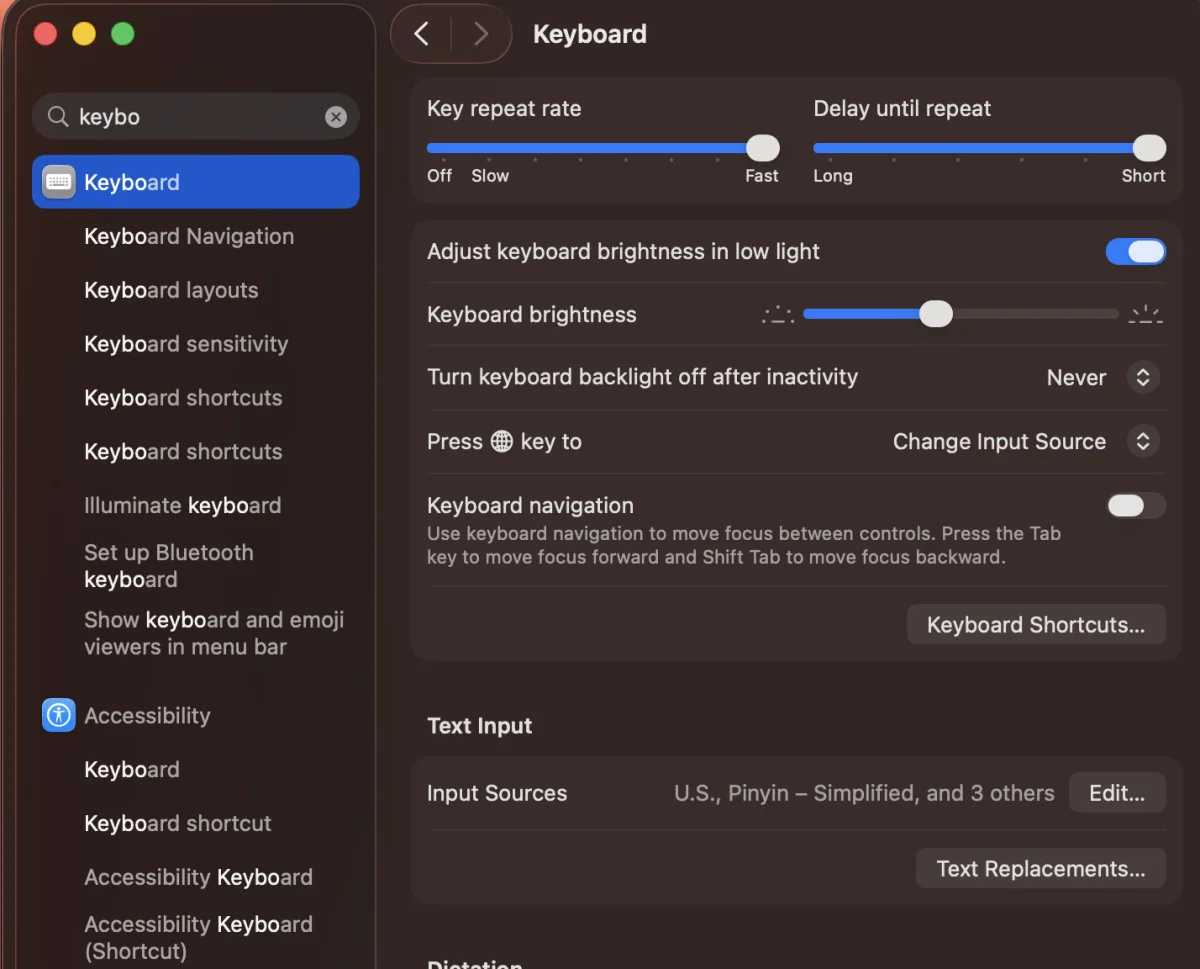
System Settings → Keyboard. Typing “keybo” into the search box at the top left is the fastest way in. Text Input → Input Sources → Edit… is near the bottom of the pane. - Click + in the sheet that opens. The sheet lists the input sources you already have; the + button is at the bottom left. While you are in here, turn on Show Input menu in menu bar — the little 简拼 in the menu bar is how you tell at a glance which keyboard you are typing with, and it saves a lot of confusion in the first week.
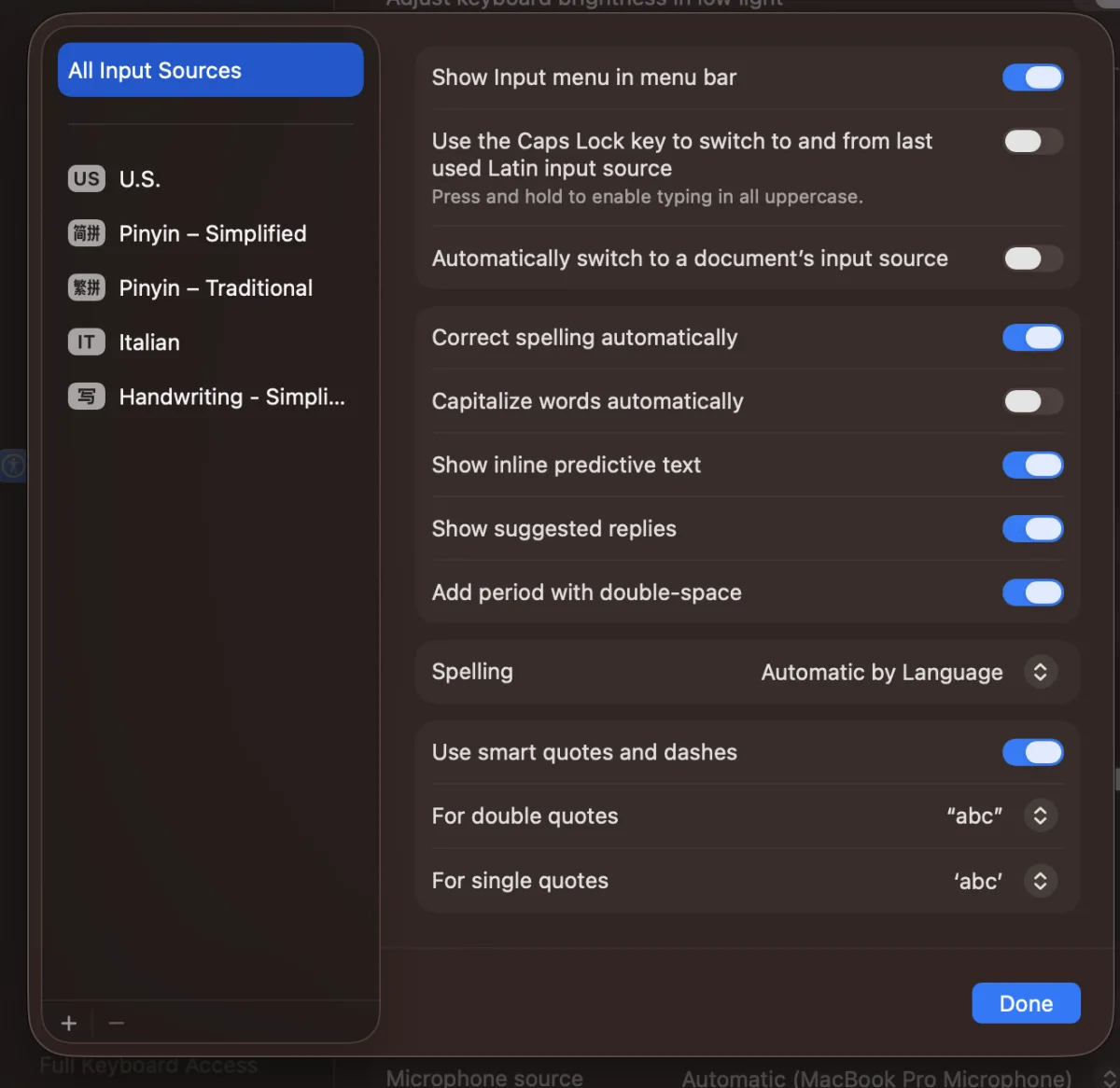
The Edit sheet lists the input sources you already have. The + button is at the bottom left. Turn on Show Input menu in menu bar while you are here. - Choose Pinyin – Simplified. Pick Chinese, Simplified in the left column, then Pinyin – Simplified on the right, and click Add. The others in that list — Shuangpin, Stroke, Wubi, Handwriting — are different ways of typing Chinese; pinyin is the one you want. For traditional characters choose Chinese, Traditional → Pinyin – Traditional, which takes the same pinyin and gives you 這個 instead of 这个.
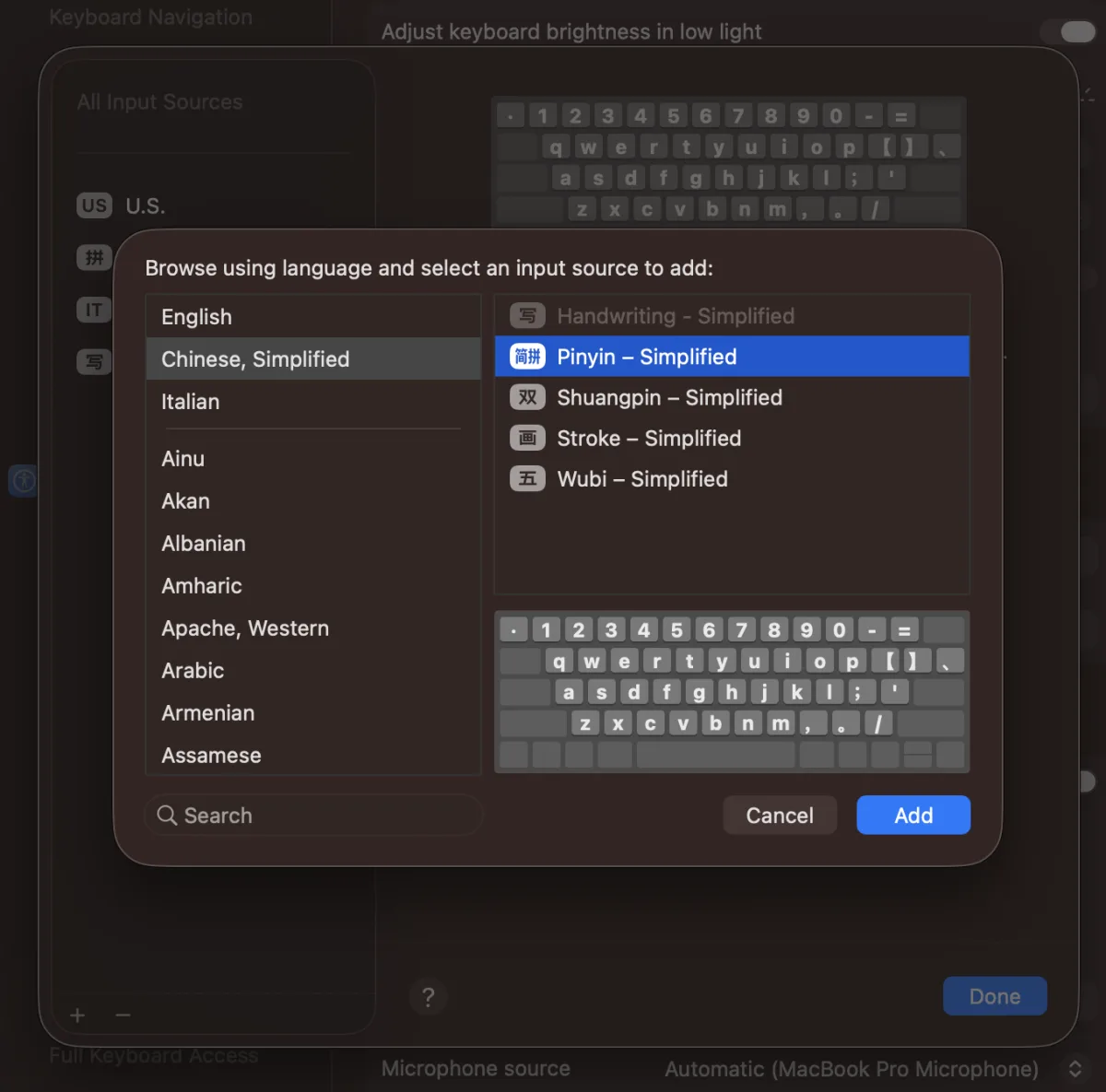
Chinese, Simplified on the left, Pinyin – Simplified on the right, then Add. Shuangpin, Stroke and Wubi are other ways to type; pinyin is the one you want. - Switch to it. Pick it from the input menu in the menu bar, or press Ctrl + Space, or tap the 🌐 globe key on a recent Mac keyboard. The menu bar shows 简拼 when Chinese is on. The same move takes you back to US.
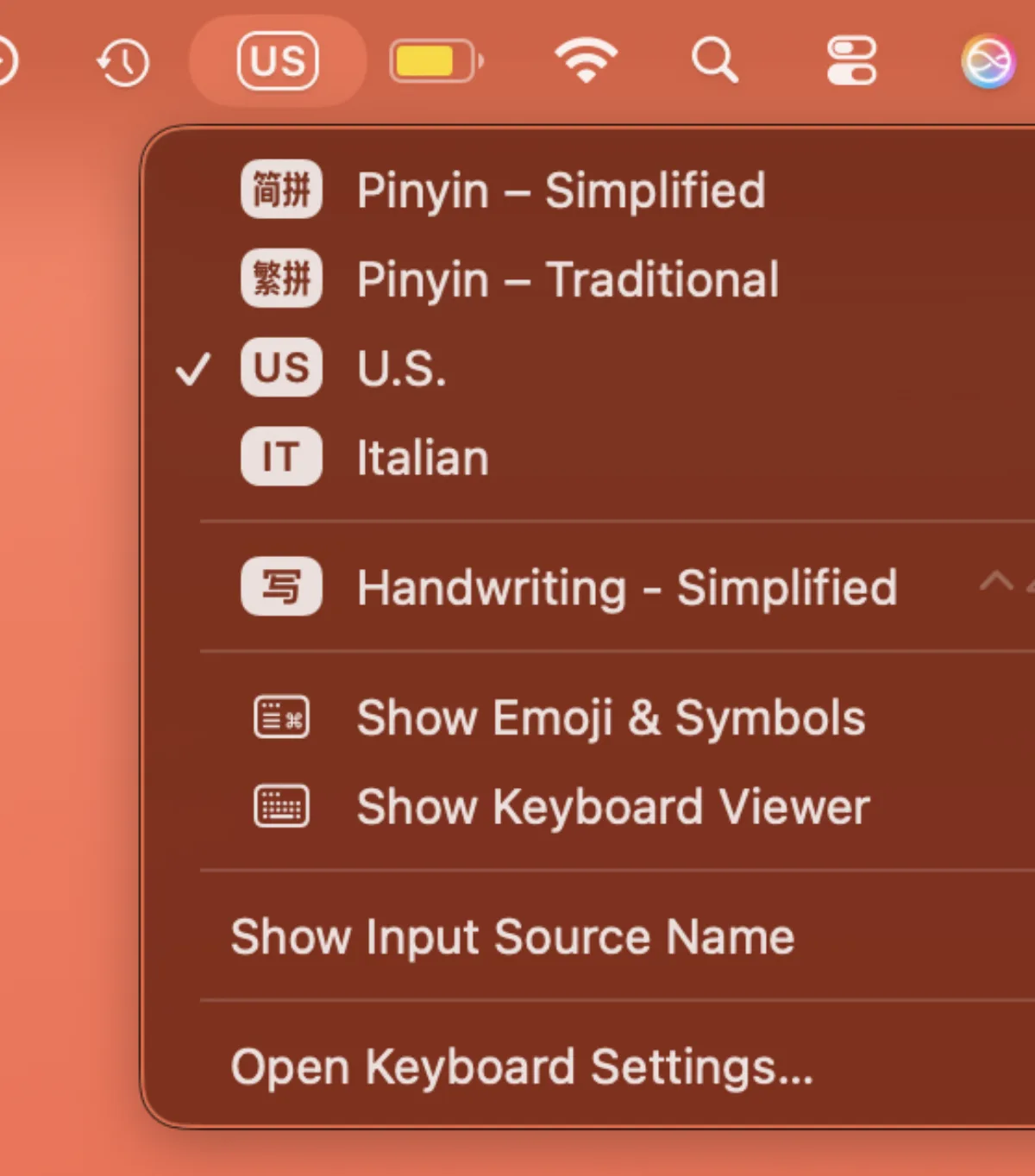
The input menu in the menu bar. Pick Pinyin – Simplified here, or press Ctrl + Space or the 🌐 globe key to switch without the mouse. - Type the pinyin, pick the characters. With 拼 showing, type nihao. A window appears under what you typed with 你好 first. Press Space or 1 to take it. No tone marks are ever typed.
That is the whole setup. It survives restarts and applies everywhere — Safari, Pages, Messages, this website's exercises.

The keys inside Pinyin – Simplified
These six do almost everything. The first two are the ones you will use in the first minute.
| Key | What it does |
|---|---|
| Ctrl + Space | Switch back to the previous input source, so with two keyboards it toggles between English and Chinese (Ctrl + Option + Space steps to the next one when you have more). The menu bar shows 拼 when Chinese is on. The 🌐 globe key does the same on a recent Mac. |
| Space | Take the first candidate — the one the input source thinks you meant. Correct the large majority of the time when you type whole words. |
| 1–9 | Take a specific candidate from the window by its number. |
| ← → | Move through the candidate list when what you want is not in the first few. |
| Shift | Tapped on its own: flip to English letters without leaving the Chinese input source. This is how you write an English word mid-sentence. |
| Esc | Throw away what you have typed so far, when the pinyin came out wrong and you want to start the word again. |
Typing ü
There is no ü on the keyboard, so pinyin's ü is typed as v: 绿 (lǜ) is lv, 女 (nǚ) is nv, 学 (xué) is just xue because after j, q, x and y the ü loses its dots anyway. This is the single most common thing beginners get stuck on.
Chinese punctuation
While the Chinese input source is on, the comma and full stop keys produce the full-width Chinese forms (,。) which are wider than the English ones on purpose. That is correct Chinese typography, not a bug. Switch back to ABC for anything you want in English punctuation.

When the wrong characters come out
The fix is nearly always the same: type more before you pick. An input source predicts from context, so it is far more accurate over a word or a phrase than over one syllable.
- Type shijian and 时间 is first. Type shi alone and you get a list of forty characters in frequency order, because dozens of characters are pronounced shi.
- Type a whole sentence in pinyin — wojintianhenmang — and macOS will usually segment it into 我今天很忙 correctly on its own.
- If a name or an unusual word keeps losing to a common one, pick it from the list a few times. The input source learns your usage and promotes it.
The menu bar says 拼 but I still get English letters
You have tapped Shift at some point and are in the English mode inside the Chinese input source. Tap Shift once more.
On an iPhone or iPad, you already have this
iOS ships Chinese keyboards. Settings → General → Keyboard → Keyboards → Add New Keyboard → Chinese (Simplified) → Pinyin. Switch to it with the globe key. It works exactly as described above, with the candidates along the top of the keyboard. Handwriting is in the same list if you would rather draw the character with a finger.
Do you need to type Chinese to learn Chinese?
Not at first, no — and it is worth being honest that typing is a slightly different skill from both reading and handwriting. Typing trains recognition: you supply the sound, and you have to recognise the right characters in a list. That is genuinely useful, and it is how most Chinese people write most of the time.
But it should never be a wall. In GraphChinese's lessons, any fill-in-the-blank that wants characters carries an I can't type hanzi right now link: the question is skipped unscored, so it cannot count against your progress, and the same instructions as this page appear in a popup. Nothing in the course is gated on having an input source installed.
Now that you can type it: how much Chinese do you know? The free HSK placement test takes about ten minutes and returns your level on the new HSK 3.0 scale. The typing guides for other devices are here: iPhone, Android, Chromebook, Microsoft Pinyin shortcuts, and pinyin with tone marks.
Sources
- Apple Support: Set up a Chinese or Cantonese input source on Mac. Source for the System Settings > Keyboard > Text Input > Edit path for adding Pinyin - Simplified.
- Apple Support: Type Chinese using Pinyin - Simplified on Mac. Source for typing pinyin, choosing from the candidate window and typing ü as v.
- Apple Support: Switch to a Chinese or Cantonese input source on Mac. Source for switching input sources from the menu bar, keyboard or globe key.
Checked October 2026. Where this page counts something from GraphChinese's own data, it says so.
Questions people ask
Do I need a special Chinese keyboard to type Chinese on a Mac?
No. Almost nobody in mainland China uses a keyboard with characters printed on it. You type pinyin on the ordinary keyboard your Mac came with, and the input source offers the characters that pinyin could be; you pick one. It is built into macOS and free.
Where are input sources in the new System Settings?
System Settings → Keyboard → Text Input → Edit…, then the + button. Apple moved this in macOS Ventura when System Preferences became System Settings; on Monterey and earlier it is System Preferences → Keyboard → Input Sources, and the + button is in the same place.
How do I type tone marks like nǐ hǎo?
You do not, and you should not try — Chinese is written in characters, and the input source takes untoned pinyin. Tone marks are a teaching aid for learners, not part of written Chinese. If you specifically need pinyin with tone marks for notes, type the tone number instead — ni3 hao3 — which most learning tools, GraphChinese included, accept directly.
Why are the wrong characters coming out?
Almost always because you are typing one syllable at a time. An input source guesses from context, so it is far more accurate over a whole word or phrase: type shijian and 时间 is first, but type shi alone and you get a list of forty characters in frequency order. Type the whole word, then pick.
What is the difference between Pinyin – Simplified and Pinyin – Traditional?
Only which characters come out. Both take the same untoned pinyin. Simplified is used in mainland China and Singapore, traditional in Taiwan, Hong Kong and Macau. If you are studying HSK, you want Pinyin – Simplified.
The globe key does something else on my Mac
The globe key doubles as Fn, and what it does is configurable under Keyboard → "Press 🌐 key to". Set it to Change Input Source, or just use Control+Space, which works on every Mac.
Get the free references
The 200-word list, the full curriculum order, and every HSK word list — sent once, plus a rare note when a new free reference ships. No account needed for any of it.
Now that you can type it, learn what to type. GraphChinese teaches HSK 1–6 in dependency order on a knowledge graph, gating each topic on proven mastery of what it needs and scheduling reviews to land just before you would forget.
Start learning